A proposal page that asks the question
The Dawaitna Team · 2026-11-13
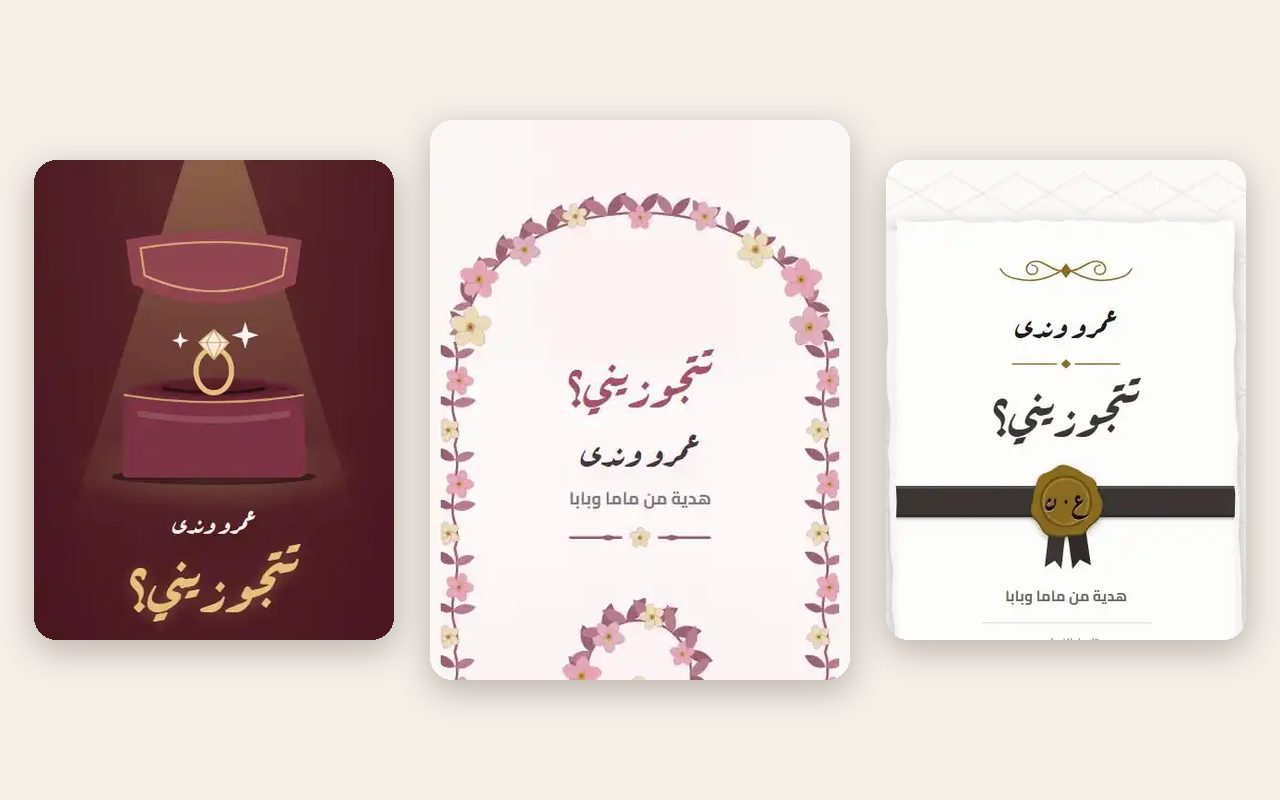
A proposal is the one message you cannot afford to get wrong. A page gives you a place to say it properly, in your own words, before the question appears.
Designs
Three designs, each with three palettes and three fonts.
Ring box is dark velvet, gold and a ring that shines. Flower arch is an arch of flowers with the question in the middle. Sealed letter is thick paper, a wax seal and a ribbon.
The ring box is the most traditional. The flower arch is softer and looks more like a garden. The sealed letter is the one for someone who has always liked getting letters.
In colours, Ring box comes in Burgundy, Obsidian gold and Navy; Flower arch comes in Rose, Sage and Blush champagne; Sealed letter comes in Ivory, Kraft and Burgundy. The fonts are your choice too: Ring box has Ruqaa, Cormorant and Amiri, and the other designs have three of their own. You can also set the text size to smaller, normal or larger.
How they open it
Three openers, and the first is the default.
- Ring box. They tap the box and it opens.
- Heart in one line. They tap and a heart draws itself in one line.
- Light switch. They flip a switch.
The ring box is the obvious choice with the ring box design, and it works well. If you pick the sealed letter, a heart drawing itself feels more private.
What to write
The page shows the line "Will you marry me?" on the card, and the form asks for two names. The date on the form is today's date, because a proposal has no counter.
The main content is a letter, about 1,500 characters at most, and you can add up to twelve photos with captions. A short letter that says why, and says it plainly, tends to land better than a long one. A few things that help:
- Say what you saw. The day you knew is a better reason than a list of qualities.
- Say what you are asking, in your own words, without hedging.
- Use the photos for the story of the two of you, in order, so the page reads like a short film before the question.
The page also has stock lines, such as "I want to spend my life with you" and "You are my choice". Read them and keep one if it is true. Replace the rest.
Before you send it
Plan the moment around the page, not the other way round. Decide where the person will be when the link arrives, who else will be nearby, and what happens in the five minutes after they finish reading. Open the preview yourself, on the phone they use, so you know how the first screen looks. Nothing here is hard, but a proposal does not get a second try.
The link goes out on WhatsApp like any other. Whoever taps it sees the page open in the phone browser, with nothing to install and no account to make.
Making one
Start at the proposal pages, try the three designs, and pick the colours. You can build and preview the page before paying, which is useful here: open the preview on your own phone and see how it feels. After you publish it, it is free for 24 hours to anyone with the link. Then it needs a one-time payment by Instapay or a mobile wallet. The price is on the occasion page.
You can edit until the day you will give it, or for 72 hours after you first publish, whichever is sooner. After that the page stays up and closes to changes. If you want to change a word after that, ask us and we can reopen it.
It comes in Arabic and in English, in case the family you are asking reads one of them better.