Cash gifts on a wedding invitation: Instapay and mobile wallets
The Dawaitna Team · 2026-10-24
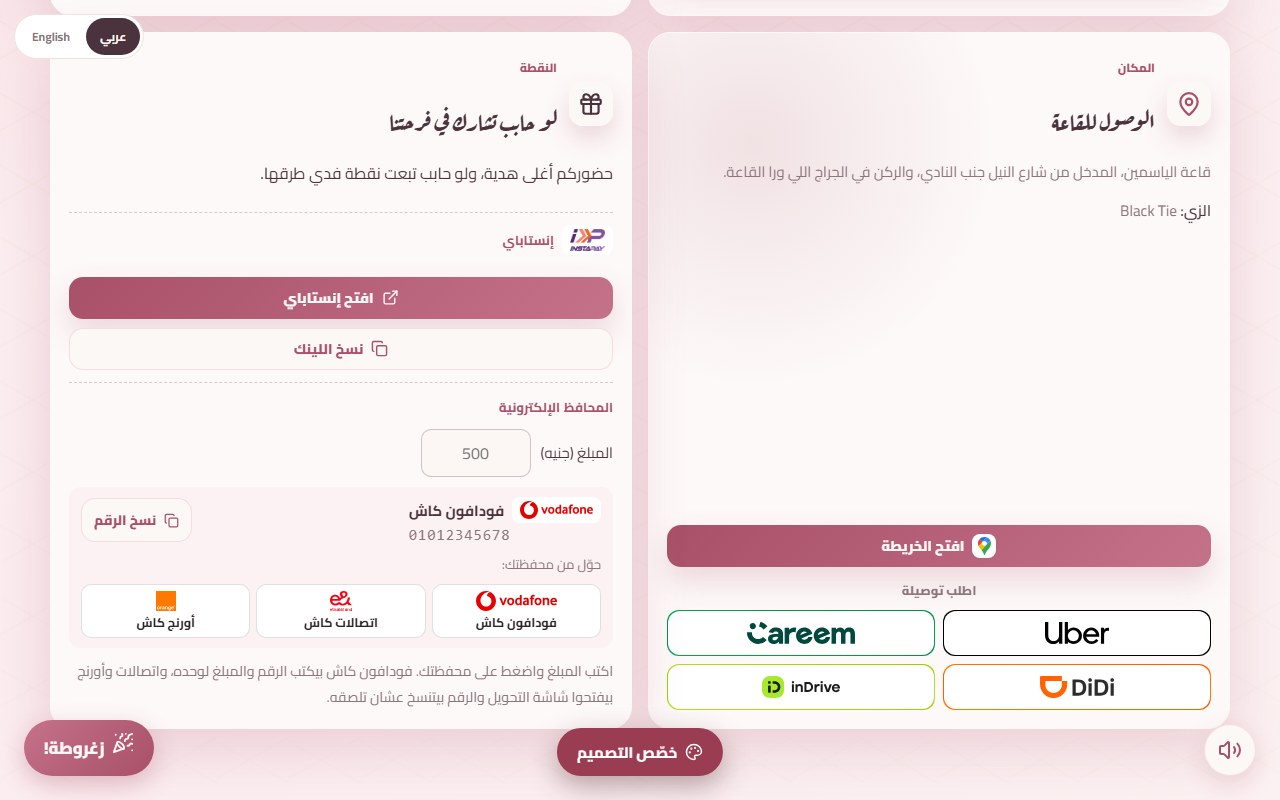
The nuqta is part of almost every Egyptian wedding, and it has always been an envelope handed over at the hall. That leaves out the cousin abroad, the friend who couldn't travel, and anyone who stopped carrying cash years ago. It also leaves the envelopes themselves: one that gets lost in the crush of the zaffa means someone's gift was never noted.
How it looks on the page
The invitation can carry a section called "the nuqta". It opens with one line: your presence is the real gift, and if you would like to send one too, here is how. Under it are the ways to send.
The section is off at the start, and nothing about it shows to a guest until you switch it on. A couple who prefers to keep the idea off the invitation never notices a gap.
Instapay
Open Instapay and create a payment link in your name. It starts with ipn.eg. Paste it into the section once. Guests get two buttons: one opens Instapay with your account ready, the other copies the link in case the app doesn't open.
Test the link yourself before you publish, and open it on someone else's phone. A link that is missing one character sends a guest to the wrong person, or nowhere.
Mobile wallets
You can add up to three numbers across Vodafone Cash, Etisalat Cash and Orange Cash. The guest types an amount and taps their own wallet, not yours. That is on purpose: Egyptian wallets can all send to each other, so a guest who uses Etisalat Cash can send to your Vodafone number.
With Vodafone Cash, the phone dials the whole transfer code with your number and the amount already in it. Etisalat Cash and Orange Cash open their transfer screen, and your number is copied so the guest can paste it.
Where the money goes
Straight to you. Each button opens the guest's own banking app or wallet, and the transfer happens there. Dawaitna takes no cut, never holds the money and records no amounts.
That also means the invitation holds no list of who paid how much. To find out, you open your Instapay or wallet statement, which is why the note is worth writing.
The note that matters
There is room for one short line above the buttons. Use it to ask people to write their name in the transfer, for example: "Please put your name in the note so we can thank you." Without it you will find a transfer from "Mohamed A." after the wedding and have no idea which Mohamed.
Common mistakes
- Someone else's wallet number. Use the groom's or the bride's own number, not a parent's or a brother's, unless you agreed on that.
- Switching the section on with nothing in it. A guest finds nothing to tap.
- Forgetting the note. Names don't record themselves.
- Three wallets when one is enough. The guest picks their own wallet, not yours.
Setting it up
After you publish, open the editor and go to the cash gift section. Add the Instapay link, the wallet numbers or both, write the note, and switch the section on. You can see it working on the demo invitation, next to the venue card.